Listeo Update 2.2.4 Report
 purethemes
6 min read
purethemes
6 min read
Listeo 2.2.4 is out, together with a big update to Listeo Monetization Plus. The headline is Banner Ads: a new way to earn money from your directory by selling ad space directly to local businesses. On the Listeo side, you get a calendar view for bookings, a custom region URL base, lighter gallery uploads and a round of map and security fixes.
- Banner Ads: sell ad space on your directory, with a self-serve booking page and WooCommerce payments.
- Bookings calendar: see every booking by month, week or agenda in wp-admin.
- Region base: replace
/region/in your URLs with your own word. - Lighter uploads: photos are scaled down in the browser before they are uploaded.
- Fixes: maps, date search, listing descriptions and security hardening.
Banner Ads: sell ad space on your directory
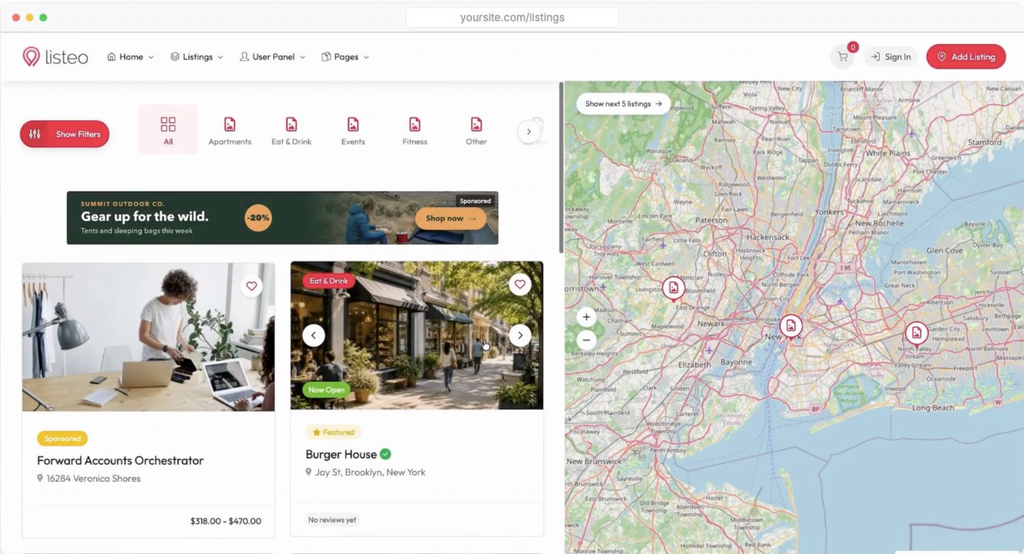
Your directory already has the audience that local businesses want to reach. Banner Ads, a new module in Listeo Monetization Plus, lets them buy that visibility without emailing you or waiting for an invoice.
How it works
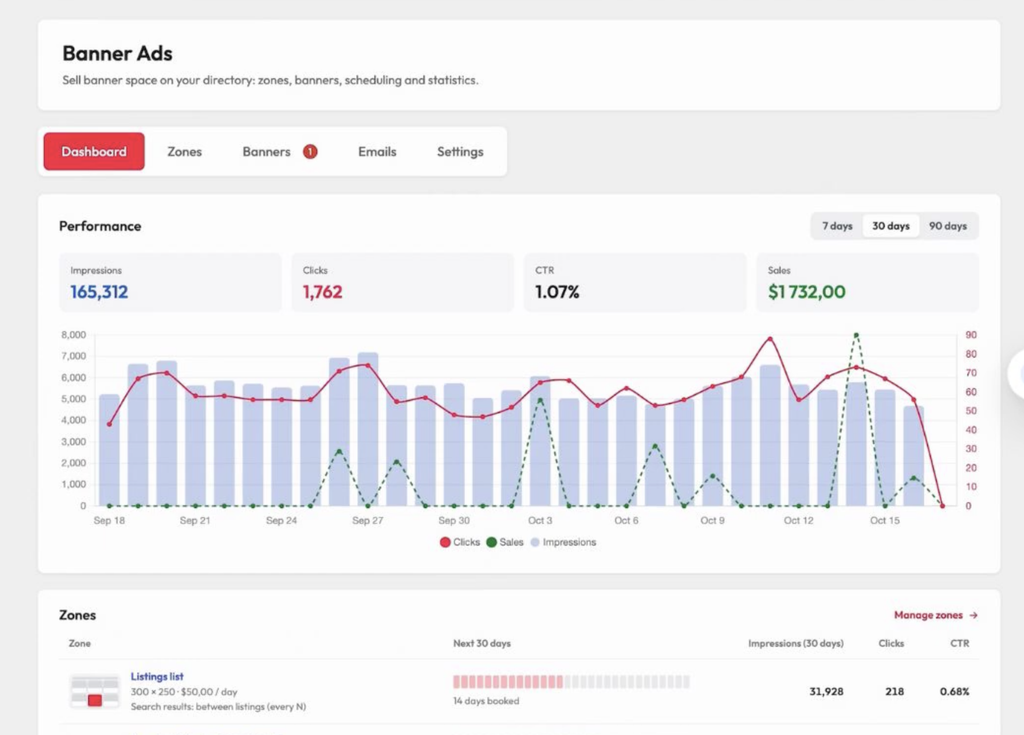
- You create zonesA zone is a place on your site with a size and a price per day. Put one between search results, in the search sidebar, on single listing pages, above the header, above the footer, or anywhere with a shortcode, widget or Elementor widget.
- Advertisers book themThe Advertise page walks them through three steps: pick a spot, choose dates on a live availability calendar, and upload a banner that is cropped to the right size in the browser. They see the total price, including long-campaign discounts, and pay through your regular WooCommerce checkout.
- You approvePaid banners wait for your review (or switch on automatic approval). Approve them, or reject with a reason that is emailed to the advertiser so they can fix and resend.
What else is included
Subscriptions no longer just expire
Also new in Monetization Plus: when a listing subscription lapses (cancelled, paused or unpaid), live listings can move to a fallback package, for example a Free plan, instead of disappearing from your directory. When the subscriber renews, the listings move back to the paid plan.
Set the fallback package on the listing package product in Listeo Core. This applies to the “Listings stay live while the subscription is active” mode. Listings beyond the fallback package’s limit expire as before.
What’s new in Listeo 2.2.4
/region/ with your own word in Settings > Permalinks > Region base. Permalink changes now take effect after a single save.Calendar view for bookings
The Calendar tab loads up to 500 bookings at a time, hides cancelled and expired bookings unless you pick that status in the filter, and clicking a booking opens its details. The booking list filters also work again: they no longer end on “Sorry, you are not allowed to access this page”.
Your own region URL base
Not every directory is in English. Leave the new field empty to keep your current /region/ URLs. A base that collides with another Listeo base is refused with a notice.
Lighter, safer gallery uploads
Smaller uploads mean fewer timeouts on shared hosting, and scaled photos are sent without camera metadata such as GPS position. Adjust the size in Listeo Core > Submit Listing, or set it to 0 to upload originals. The form waits until every image has finished uploading.
Map fixes
- Tiles: OpenStreetMap tiles load from the current tile server.
- Location radius: the all-listings map keeps working after a visitor shares their location with a search radius.
- Clustering off: the all-listings map shows individual markers (very dense areas still group until you zoom in).
- Find my location: with OpenStreetMap it keeps your zoom level and no longer moves another listing’s marker, and with Google Maps the results now refresh.
Other improvements
- Promotions: “Listeo Ads” is now called Promotions everywhere in the interface. Only the wording changed, your settings and data stay the same.
- Admin menu: Listeo Core settings are grouped into Settings, Tools, Add-ons and Licenses.
- Date search: date range search reads day-first dates with month names correctly (for example “25 декабря 2026”).
- Descriptions: listing descriptions keep their paragraph breaks after editing in both the block editor and the dashboard.
- Bulk updates: updating plugins from Appearance > Install Plugins no longer stops with an error when one plugin needs a newer PHP or WordPress version.
Security
How to update
- Download the latest packageGet the newest Listeo files from purethemes.net/license.
- Update the theme and plugins togetherUpdate the Listeo theme, Listeo Core, Forms & Fields Editor and Listeo Elementor, since some fixes need both. Follow How to update the theme and plugins.
- Update Monetization Plus and clear your cacheIf you use Listeo Monetization Plus, update it as well to get Banner Ads. Then clear your site cache.
Full list of changes: Listeo changelog.
FAQ
-
Do I need Listeo Monetization Plus for Banner Ads?
-
Which payment methods can advertisers use?
-
Will Banner Ads change my site right after the update?
-
Does the Promotions rename change my existing promoted listings?
-
I use a page cache. Will banners still rotate?