Author Archive

How to fix login stuck at “sending user info, please wait…”?

If you’re experiencing issues during logging in in and you get stuck on message ‘Sending user info, please wait…‘ there might be couple of issues:

  1. Most common cause of this problem are cache plugins active on your site. Try to disable them to see if that help. If it does – you may need to adjust plugin settings, as some may have aggressive optimization. For example, in WP Rocket, set the cache lifespan to 10 hours or less.
     
    If it still happens from time to time we suggest enabling “Skip additional login/registration security check” option in Listeo Core → Registration
  2. Another but less common reasonis often related to custom mod_security rules. Some hosting providers block login requests from non standard paths, so try to contact your hosting provider and ask them about it.
  3. And last but not least, you may experience this issue on nginx server, in that case, add the following lines to /etc/nginx/nginx.com
    fastcgi_temp_file_write_size 10m; 
    fastcgi_busy_buffers_size 512k; 
    fastcgi_buffer_size 512k;
    fastcgi_buffers 16 512k;
    client_max_body_size 50m; 
    proxy_buffer_size 16k; 
    proxy_busy_buffers_size 16k;

    if that won’t help, check if you have Nginx Content caching enabled, you might need to disable that to fix that problem
Why I have so many Products on my WordPress site?

Every time you create a listing, it creates a “shadow copy” of that listing in Products. So each listing has assigned its own product in WooCommerce -> Products. This is created to handle payments for Booking, so when booking request is confirmed, it creates WooCommerce order for that product, and user is able to pay for it.
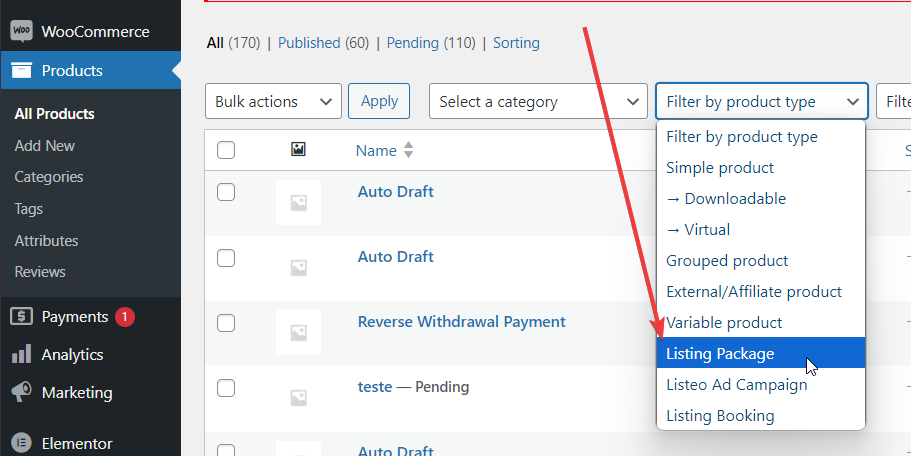
Those products are set to product type “Listeo Booking”, they are not visible on front-end, and not indexed by google.

If you’re looking for only listing or ad campaign packages, please use the filter:

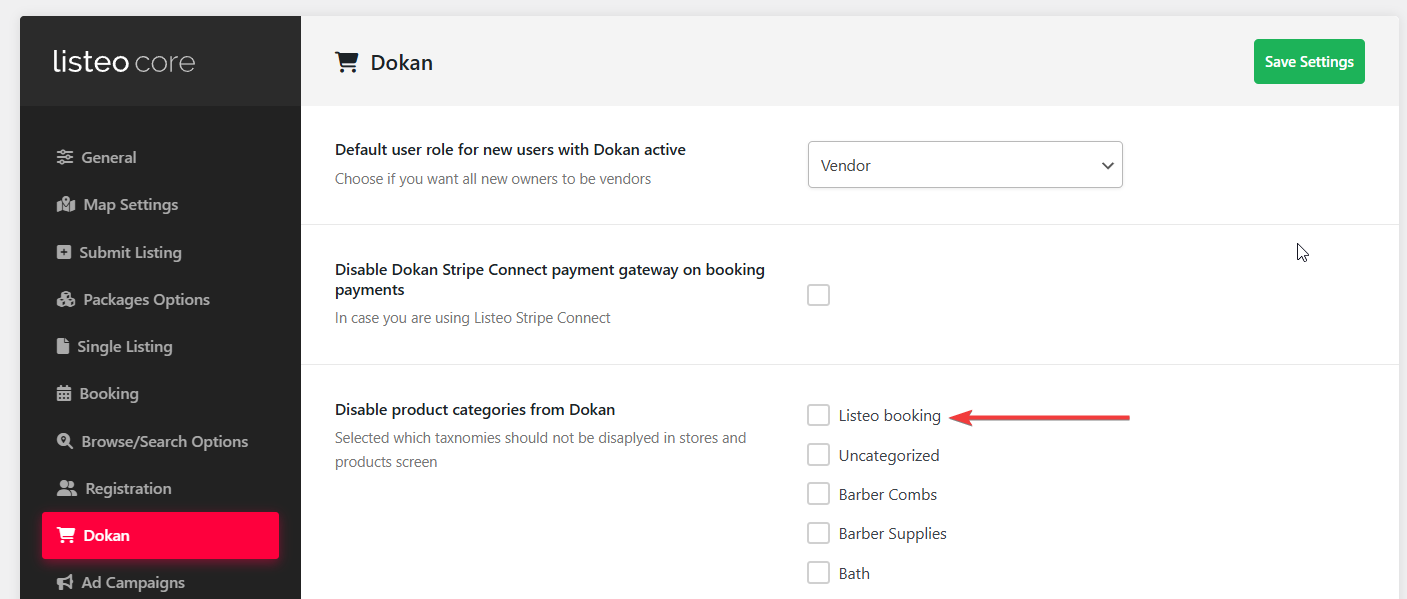
If you see these products on front-end shop you can disable then in Listeo Core → Dokan → Disable product categories from Dokan 

Search by date range

Until version 1.4.3 the “date range” field was used only to search for rental listing types. Since 1.4.3 we’ve added support for event type listing, but because of the way the search works, you can search for rentals and for events at the same time. For rentals, we’re looking for dates where the listing have no bookings made, and for event we search for dates which are in the selected range.


Setting Up date range

Go to Listeo Editor -> Search Form, choose the type of search form, if it already has Date range field click it to open, if no, drag the Date range field from Available searchable elements to the place in Search form, and click Save.

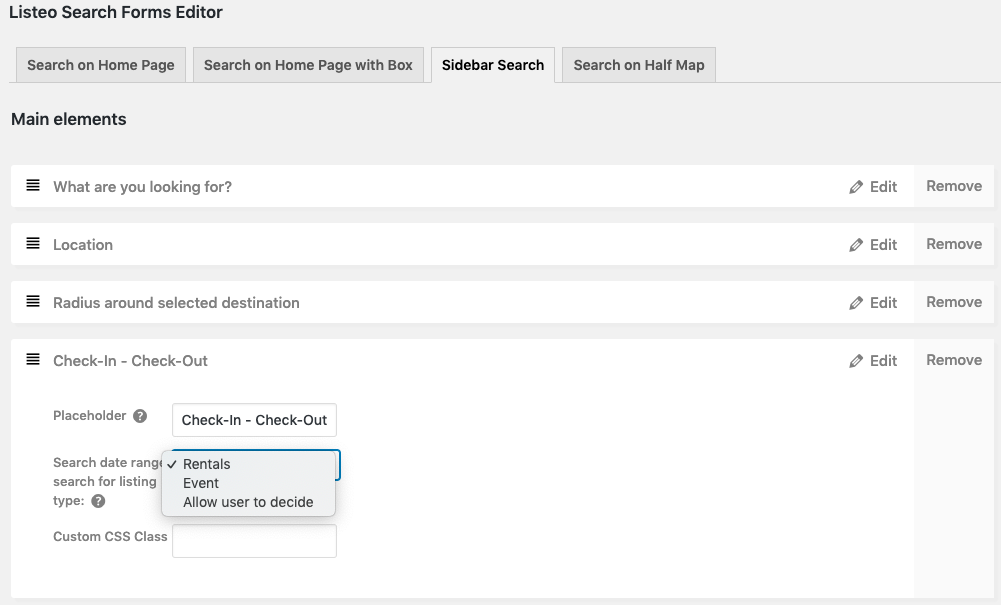
Now, click this new field to open its options. You should see this.

By choosing Rentals, you will limit Date Range only to rental listing type, and by choosing Event you will search only for events.

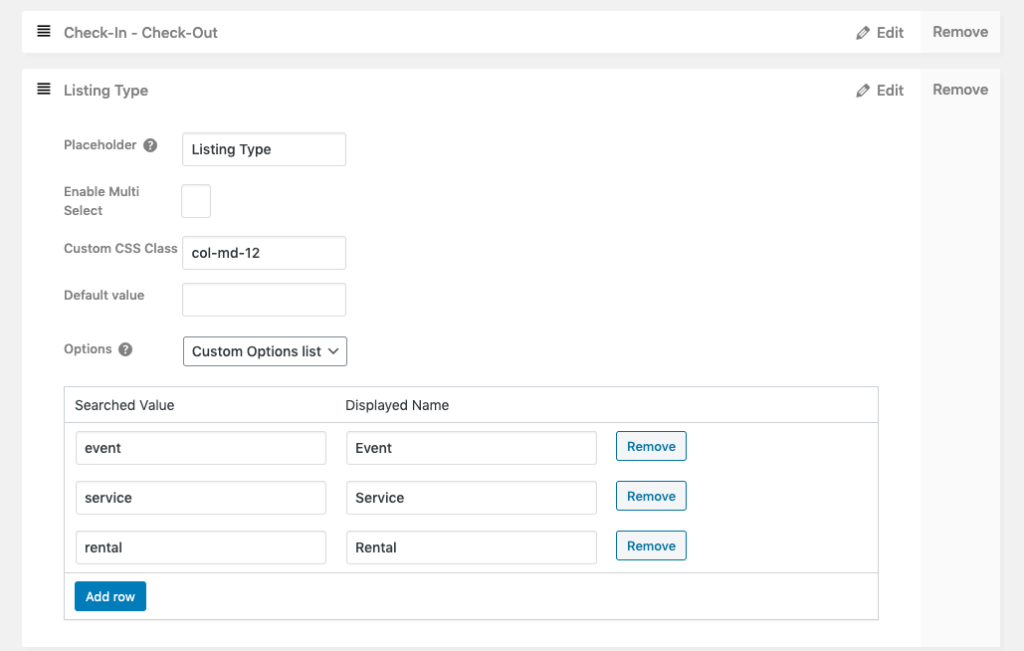
If you have both types and want to allow users to choose, select the last option, and drag from the Available searchable elements  the Listing Type field, that will allow user to select which listing types they want to search for.

You can of course remove service type as this won’t be returning any results. Date search for services is currently not available.

Coupons

How to add new coupon by owner

To add a new coupon, go to Dashboard → Coupons and click Add New Coupon. The opening screen will present you with the coupon code and other settings.


How to set up a coupon widget

If you would like to display a widget with coupon code and description first you have to add Coupon Widget in Appearance → Widgets for Single Listing Page

Then you can select specific coupon and enable widget for each listing in listing editor:


Managing coupons

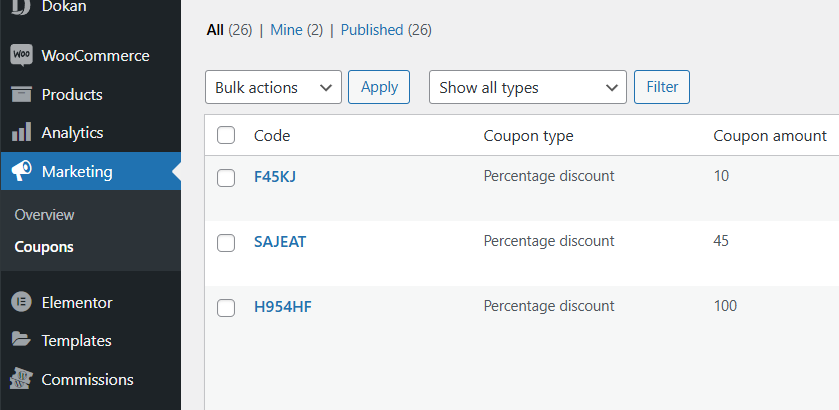
From WordPress admin in WooCoomerce. Navigate to WP Admin → Marketing → Coupons. You can manage there both user coupons and own created by site admin.


Coupons do not work

If after all steps above you still can’t see coupons in listing pages and add listing form most likely you disabled them in  Listeo Core → Booking → Remove Coupons option from Booking widget and confirmation

Also make sure “Coupons” page is created with [listeo_coupons]  shortcode and assigned in Listeo Core → Pages → Coupons Manage Page


Categories and Sub Categories

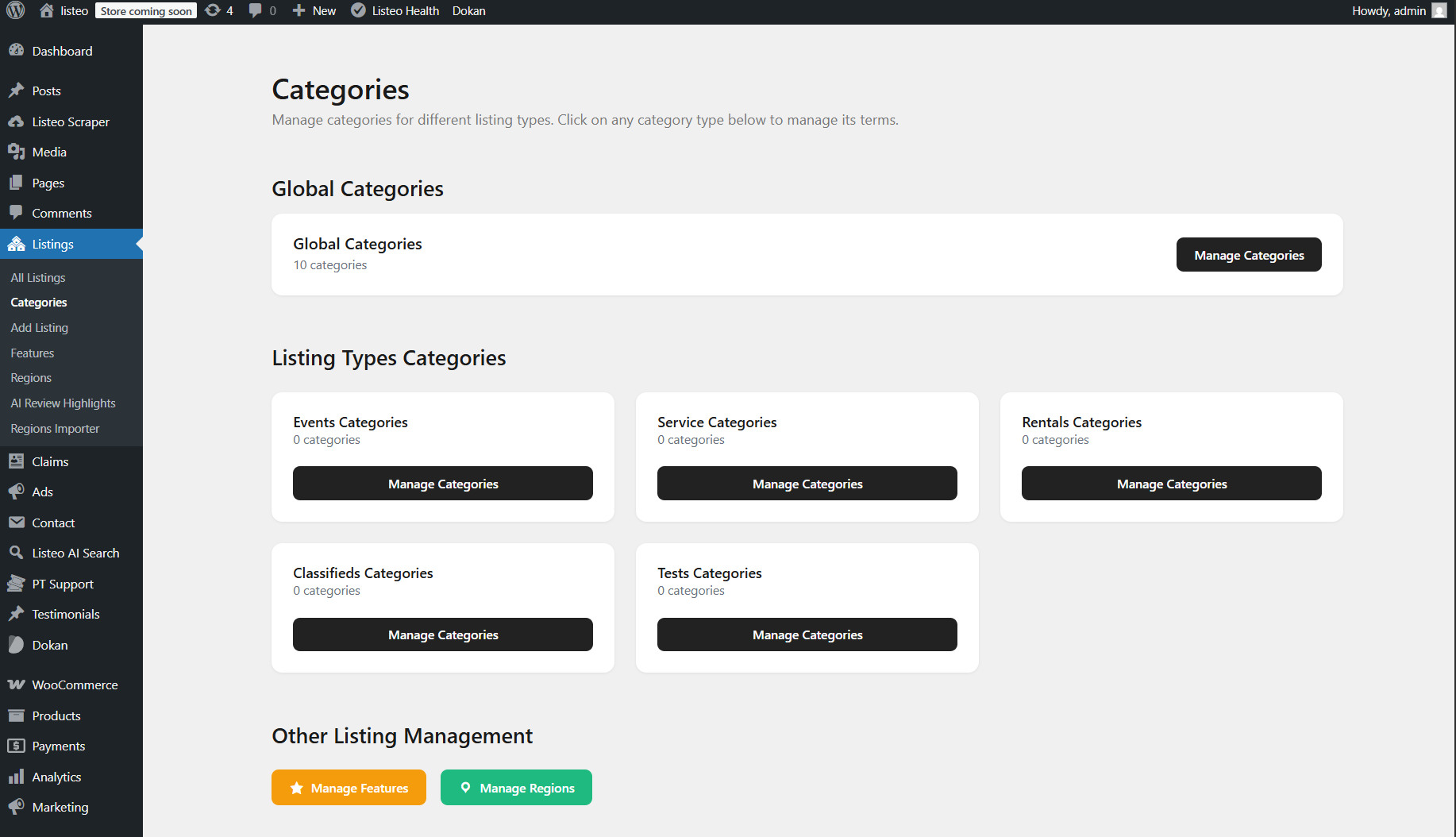
This guide explains how categories work in Listeo. You can modify categories by navigating to WordPress Dashboard → Listings → Categories

Unlimited-Level Navigation, an example:
Level 1: Listing types (Services, Rentals, Events, Classifieds)
Level 2: Categories specific to each type (e.g., Restaurants under Services)
Level 3: Sub categories related to previous parent category (e.g. Italy Food, Asian Food under Restaurants)

User Flow:
1. User click drilldown field
2. Select listing type (e.g., “Services”)
3. Select specific category (e.g., “Restaurants”)
4. Can drill deeper into subcategories if available


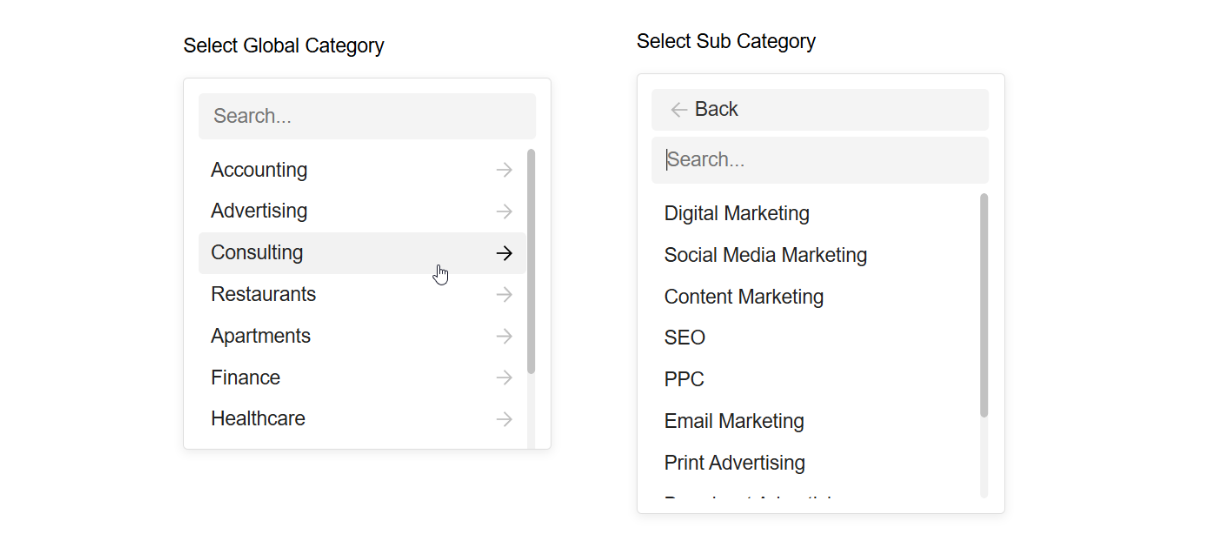
Option 1 (Global Categories Drilldown)

This approach works best when listing types have common categories between them. By using Global Categories shared across all listing types, users start with the main shared categories at the surface level, then navigate through hierarchical subcategories as they go deeper.

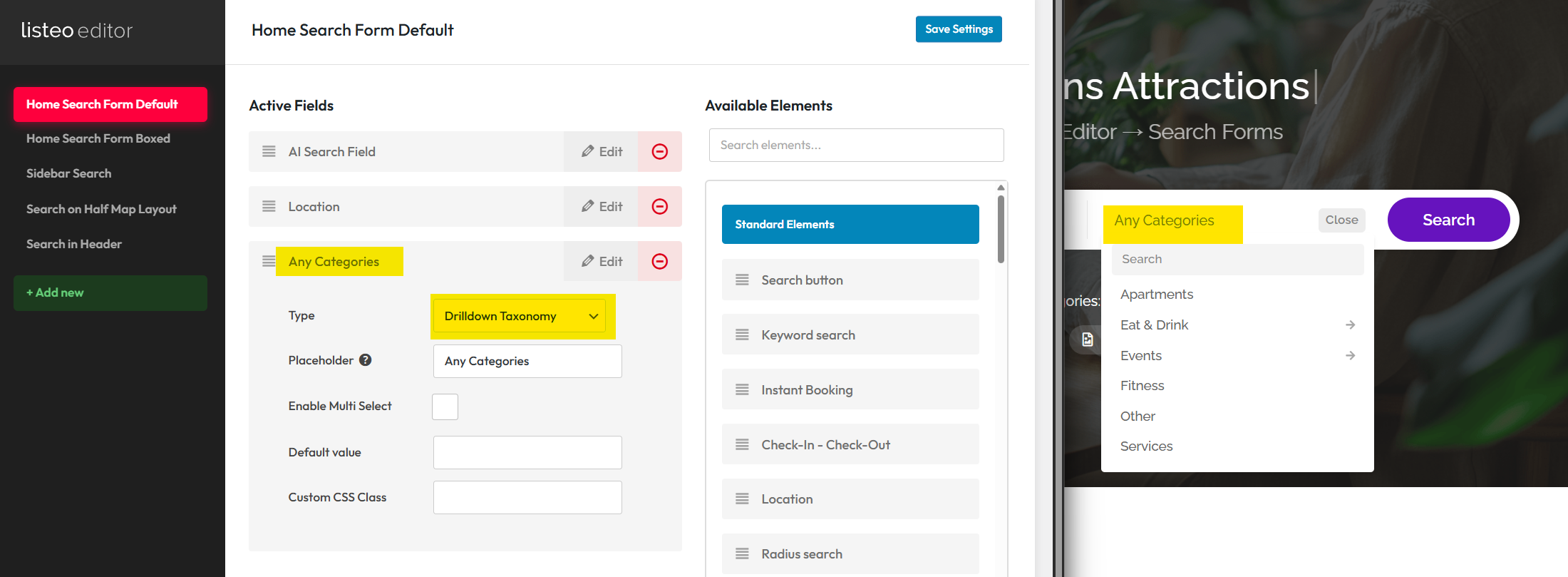
Simply add “Any Categories” search filter, select “Drilldown Taxonomy” and add to the search form where you need it.

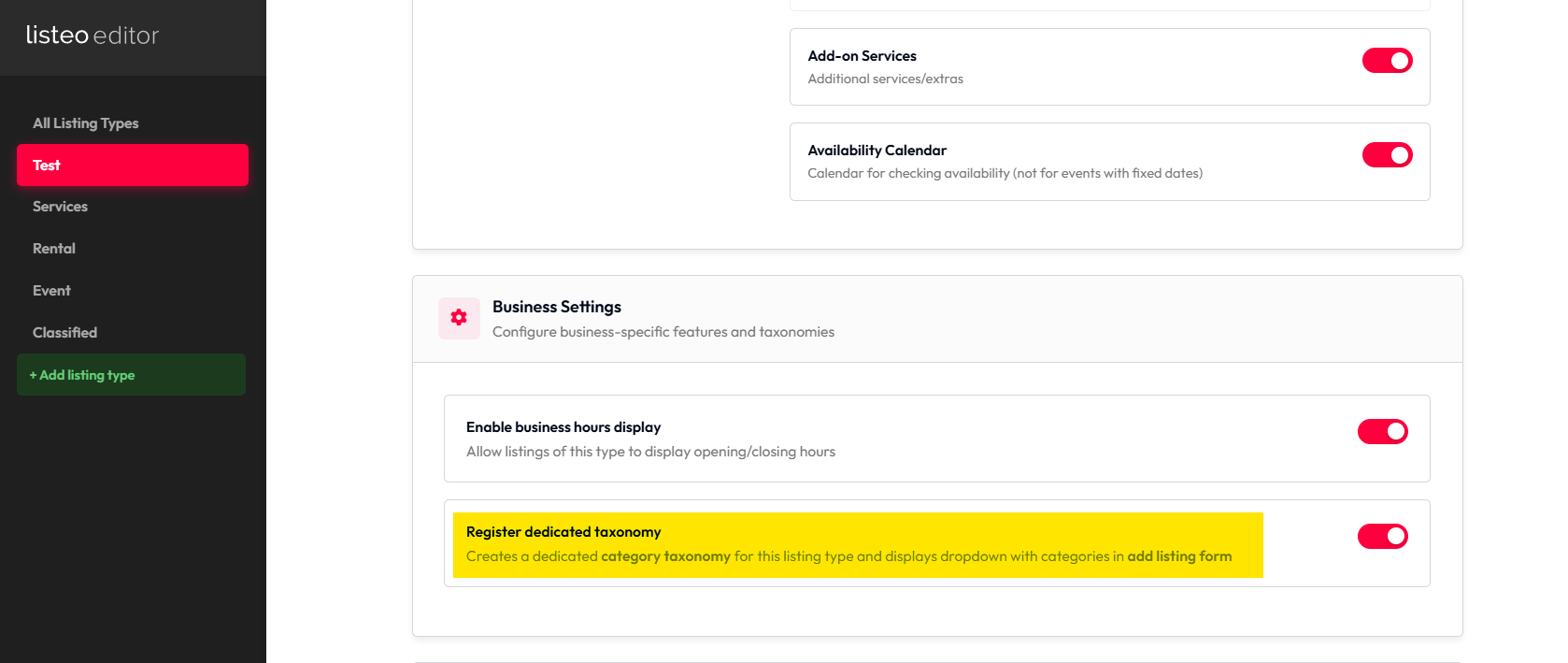
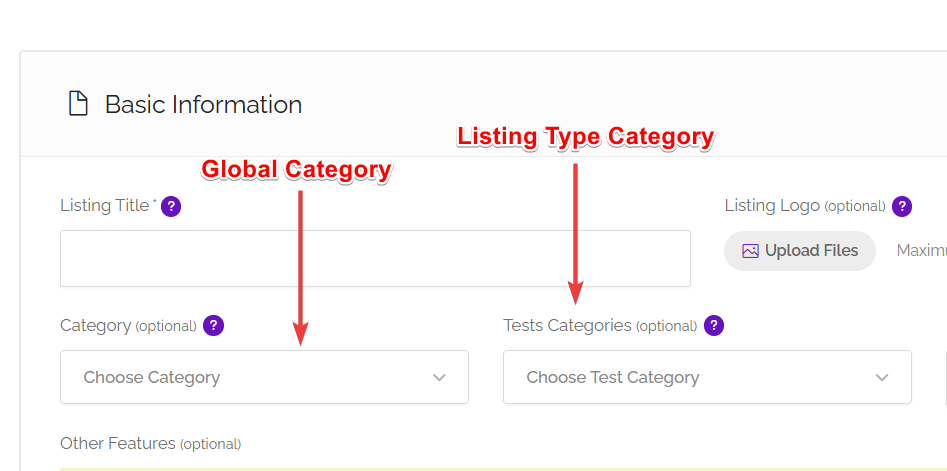
To avoid displaying both Global and Listing Type categories in add listing you need to disable “Register dedicated taxonomy” option


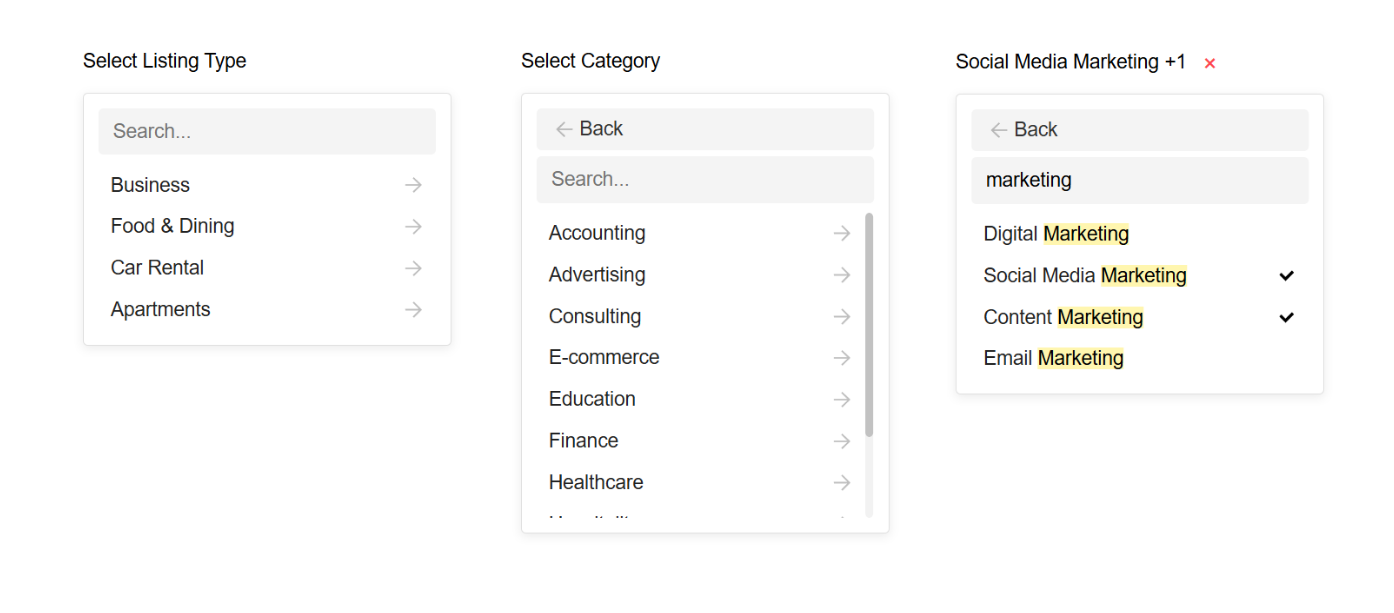
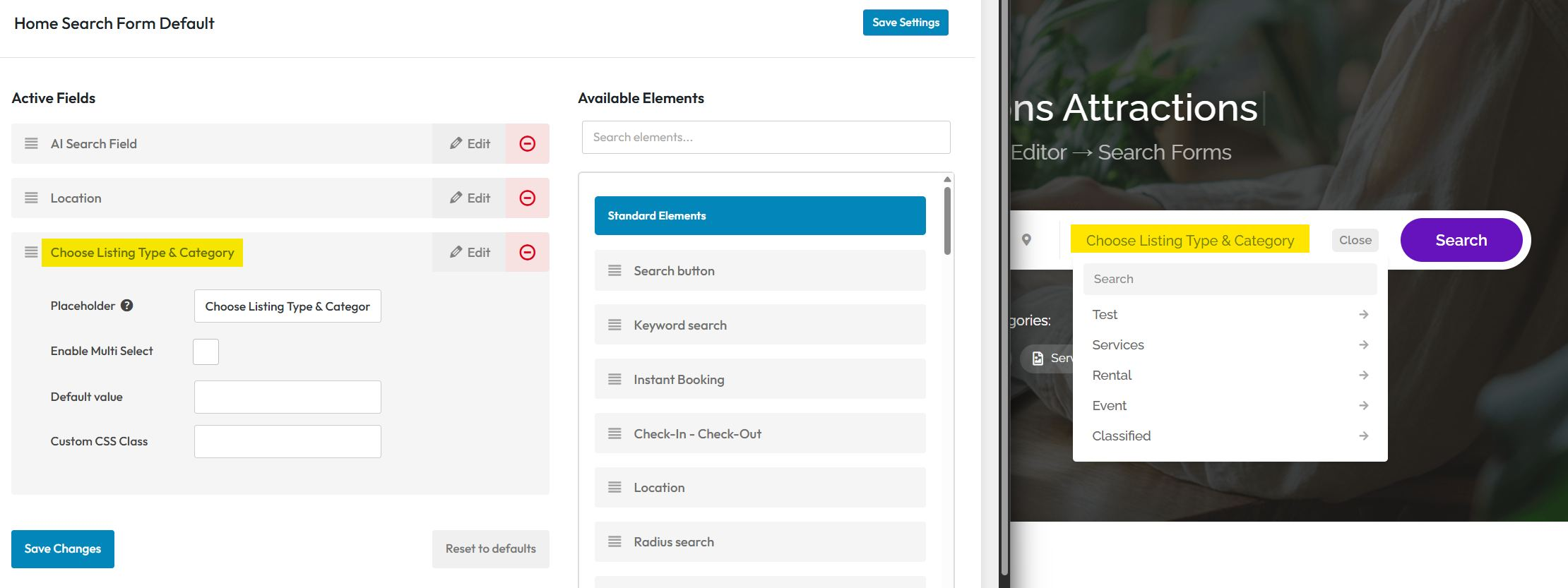
Option 2 (Listing Type + Categories Drilldown)

This approach works well for unrelated listing types with distinct category structures, using a hierarchical, multi-level dropdown menu. Users start with the main listing types at the surface level, then navigate through nested categories specific to each listing type at deeper levels.

Main advantage of this approach is the fact that you can edit for each listing type add listing form individually.

Requires Listeo at least Listeo v2.0

When creating custom listing type make sure to check “register dedicated taxonomy” – this will display listing type in categories page.

Add the “Choose Listing Type & Category” search filter to the search form using Listeo Editor.

To display  Listing Type categories in add listing you need to enable “Register dedicated taxonomy” option

You can remove “Global Category” dropdown in Listeo Editor in this case if you won’t use it and leave only “Listing Type Categories”


Option 3 (Chained selection)

With this option you set relation between separate taxonomies, and with two (or more) separate select dropdown you create a chained selection, for example you have a Car Marketplace where you can select Make as a taxonomy listing all car manufacturers and if you select BMW you’ll get a list of all BMW models from Model taxonomy, that are assigned to BMW term.

More about this is explained in separate article

Related Taxonomies Chained Select


Bulk Add Categories

This feature in WP Admin → Listings → Bulk Add Categories allows you to quickly import multiple categories and subcategories at once using a simple text format.

Simply enter one category per line, use dashes to define hierarchy levels (- for subcategory, — for sub-subcategory), and optionally add FontAwesome icons using the pipe separator (e.g., Restaurant|fas fa-utensils).

You can AI assistants like ChatGPT or Claude to generate category lists – just copy the built-in prompt template and describe your business type. The feature supports all category types including global categories and listing type-specific categories like Service, Event, and Rental categories.

Changelog

Before browsing new features (on our demo or your website after update) please flush cache and perform “hard reload” by pressing Ctrl + F5 (or Cmd + Shift + R on Mac). 🙂

After theme update:
1. Make sure you updated also plugins (Listeo Core, Listeo Editor, and Listeo Elementor)
2. Clear your website’s cache and hosting cache after the update

16/11/2026

2.3.5

Improved
  • improvements to Lisa capabilities
Fixes
  • few fixes for dark mode and small improvements/bug fixes
Security
  • We've run another round of security audit which helped fix some issues and potential vulnerabilities.
12/11/2026

2.3.4

New
  • Some more capabilities added to Lisa in Listeo Editor
Fixes
  • Some fixes
12/11/2026

2.3.3

Release postListeo Update 2.3.3 ReportRead
New
  • Lisa, the AI assistant in Listeo Editor: she suggests changes to listing types, fields, forms and taxonomies, and nothing changes until you click.
  • Google Places API: new setting in Listeo Core > Map Settings for Google Cloud projects that can only enable the new API (address suggestions and Google reviews).
  • Listeo Editor: searchable icon picker for field icons.
Improved
  • The wp-admin listing editor and category pages no longer use the CMB2 library, so they load less code.
  • Listing Fields screen opens and saves faster on sites with many fields, and large forms are no longer cut off on save
  • Elementor Image Box, Taxonomy Tabs and Content Carousel: term pickers search all regions
  • Listeo Editor > Appearance: Listings and Single listing options grouped into collapsible sections.
  • Header Builder: the second row accepts any header element (logo, account, cart and more), and element buttons stay on screen near the edge.
  • Change Package keeps the current package until the new order is paid
  • Package page: the sidebar stays sticky on every desktop height.
Updated
  • Developers: CMB2 functions and hooks are replaced by listeo_register_meta_box() and listeo_meta_* hooks. Custom code that uses CMB2 needs an update.
Fixes
  • OpenStreetMap address search froze the page when a pasted address had extra spaces
  • Split layouts: the category slider highlighted All instead of the searched category
  • Statistics: listing titles showed HTML codes and picker texts were not translatable
  • Dark mode: headings were white outside dark mode, and in the wp-admin listing editor.
  • Login popup on cached pages no longer shows "Session token has expired".
  • Default submit form: no Booking prices and settings section for listing types without booking.
  • Footer could be sticky with Sticky Footer turned off on pages, posts and listings without their own footer style.
07/11/2026

2.3.2

New
  • Listeo Appearance Editor replaces Kirki/PureCustomizer plugin; you can deactivate it and keep your settings.
  • Commissions > Pay vendor shows vendor payment details first and lets you set payment method, reference, paid to, and internal note before recording a payout.
Updated
  • Listeo Editor > Appearance > Fonts: Host Google Fonts locally serves fonts from your site instead of Google.
  • Refreshed Commissions and Payouts pages in wp-admin.
Improved
  • Commissions > Balances shows what each vendor is owed, with search and sorting.
06/11/2026

2.3.1

New
  • New demos in Setup Wizard: Marketplace and Software & Tools demos.
  • Paid blog posts: owners can be asked to pay for posting, with the new "Blog Post Package" WooCommerce product type.
  • New listing page styles (Product, Showcase).
  • New listing card layouts (Logo, Row, Minimal).
  • Boxed split archive layout and a filters popup.
  • Elementor: Tile Hero and several other new widgets.
  • Header Builder: search in the header, second row, scrolling menu.
Improved
  • Setup Wizard: each demo is downloaded separately, only when you choose it.
Fixes
  • Add Listing: category fields came back empty after a server error, or were printed twice.
  • Updating Listeo could leave the site in maintenance mode on hosts with a short PHP time limit.
  • Header Builder: the Logout item sent users to the WordPress logout confirmation page.
  • Google Fonts: the unused Varela Round font is no longer loaded, and the locally hosted Outfit font is no longer replaced with a Google URL.
03/11/2026

2.3.0

Release postListeo Update 2.3 ReportRead
New
  • Setup Wizard: new Demo step. Pick the Multi Purpose demo or a themed starter demo (Car Dealers, Doctors).
  • Compare listings: compare button on cards and the listing page, Listing Compare widget, floating compare bar and a Compare page with side by side table, Show only differences and shareable links.
  • Custom taxonomies: create your own listing taxonomies with URL base, archives and search.
  • Related taxonomies with a Chained select element for Add Listing and Search forms.
  • Field visibility rules for conditional display in forms, listing page, cards and search filters.
  • Taxonomies can be shown among Listing Fields as a row, tags or box in listing details and as chips on cards.
  • Listing Fields: number and unit display, custom SVG icons, field label on cards.
  • Listing Fields: section layouts Standard, Highlights or Table, optionally collapsible.
  • Search forms: slider and From/To for number fields, Buttons (pick one), and Select: up to / from.
  • Search forms: result count on the search button.
  • Adaptive search filters: hide or grey out options without results, with optional counts.
  • Listeo Elementor: Search Card widget with tabs and Tabbed search style for hero widgets.
  • Sorting by any Listing Field marked Allow sorting by this field.
  • Several search forms on one page.
  • Listeo Editor: Overview, Export & Import and Repair Tools tabs.
  • Search Forms: Preview button and Add headline element.
  • Bulk Add Categories can also add Listing Features.
  • New option Order of packages to buy for the Buy New Package list.
  • JavaScript events for registration/login success with optional dataLayer push.
  • Mastodon and Bluesky as listing social links.
  • Customizer > Blog: Blog posts style and Single post layout options.
Improved
  • Faster range filters for searches combining multiple number ranges.
  • Price filter and rating filter performance improved on large sites.
  • Listing cards no longer write to the database when shown.
  • Listeo Editor redesign.
  • Add Listing Forms show element sources and warn about incompatible field types.
  • Saved searches show readable summaries.
  • From/To search inputs for number fields use real dropdowns with units and optional side by side layout.
  • Listings with equal sort values keep a stable order.
Updated
  • SVG uploads are allowed only for users who can post unfiltered HTML.
  • Different taxonomies in a search are always combined with AND.
  • Highest rated, Featured, Verified and price sorting include listings without a value.
  • AJAX browsing is on when the setting was never saved.
  • Listing URL bases always use the site language.
  • With Disable payments in bookings, requests waiting for approval no longer expire and Instant booking requires payment first is ignored.
  • A field hidden by Show this field when loses its value when the listing is saved.
  • The My Other Listings switch now works.
  • Price Cache, Recalculate Ratings and Data Migration moved to Listeo Editor > Overview > Tools.
Fixes
  • Reflected XSS on listing archives and the booking confirmation page; front-end Coupons ownership checks; vendor commission and Stripe Connect fields editable by vendors; payouts screen access; guest booking with book without being logged in off; SVG sanitizer and CMB2 field definitions hardened.
  • AJAX search, shortcode and Elementor widgets now find the same listings as the listings page for price and number range filters; prices with thousands separators are read correctly.
  • Saved search email alerts match the listings the search shows.
  • Disable payments in bookings now works through the whole booking.
  • With Map markers source: All published listings the map shows the same listings as the result list.
  • Setup Wizard fixes for flat main menu, persistent object cache, demo imports, term settings and images, slow hosts, Elementor kit colors reset, and PHP warnings.
  • Bulk plugin update could leave the site in maintenance mode.
  • Fatal error after updating from versions before per-type review criteria.
  • Add Listing Forms fixes for skipped taxonomy input and sections lost with form steps.
  • Package count fixes for simultaneous approvals and full package assignment.
  • Package restriction fixes for pricing, FAQ, calendar, coupons and fallback package listings.
  • Custom booking fields were not copied to WooCommerce orders with instant booking.
  • Recalculate Ratings fixed only about half of the listings per run.
  • A headline near the end of Listing Fields could disappear from the listing page.
  • Saving a listing with a long pricing menu failed on some hosts.
  • WebP and AVIF are accepted by the submit form file fields.
  • Elementor Listings widget kept its category restriction after filtering an empty category.
  • Elementor Listing Custom Fields widget in Custom Fields mode no longer prints nothing.
  • Outline SVG icons showed as solid shapes.
  • A dropdown inside an openable search panel closed the panel.
  • Phone country selector now works on mobile.
  • Admin email for a new claim request had a valid link.
  • Dokan fixes for vendor coupons and blank Add new product page.
  • TikTok links and analytics mapping fixed on sites with an unsaved Contact tab.
  • Booking Confirmation page created with Create page uses the correct template.
  • Several PHP 8 errors in search forms and smaller fixes.
18/10/2026

2.2.4

Release postListeo Update 2.2.4 ReportRead
New
  • Calendar view in Listings > Bookings that shows bookings by month, week or agenda, with the same listing, status, client, owner and resource filters as the list. It loads up to 500 bookings at a time, hides cancelled and expired bookings unless you pick that status in the filter, and shades owner-blocked days when one listing is filtered.
  • "Region base" field in Settings > Permalinks to replace `/region/` with your own word. Leave it empty to keep current URLs.
  • Setting "Resize images before upload (max px)" in Listeo Core > Submit Listing (default 2560): gallery photos larger than this are scaled down in the browser before upload. Scaled photos are rotated correctly and sent without camera metadata such as GPS position; smaller photos are sent unchanged.
Improved
  • The Listeo Core admin menu is grouped under Settings, Tools, Add-ons and Licenses headings.
  • "Listeo Ads" is now called "Promotions" in all text (menus, dashboard, settings, product type "Listing Promotion", widget "Listeo Promoted Listings").
  • OpenStreetMap tiles load from tile.openstreetmap.org directly instead of the old a/b/c subdomains. Custom tile servers are not affected.
  • Date range search reads dates correctly on sites with a day-first, text month date format
Updated
  • Region, Feature, listing-type category and listing type URL slugs are now in the translation template, so you can translate them in Loco Translate or Poedit.
Fixes
  • Gallery uploads no longer create blog, avatar, WooCommerce and extra-large image sizes for every photo, which reduces load and timeouts on shared hosting.
  • Failed gallery uploads show a short red error on the image, and the form cannot be submitted while an image is still uploading or has failed.
  • Changing any Listeo permalink base (listing, category, region, archive) now takes effect after one save. A region base that collides with another Listeo base is refused with a notice.
  • Listings > Bookings filters (status, client, owner, listing, resource) no longer end on "Sorry, you are not allowed to access this page". The Client and Owner dropdowns keep the selection and "Pay to Confirm" now matches bookings.
  • The all-listings map no longer freezes after a visitor allows location access with a search radius.
  • "Find my location" with OpenStreetMap no longer moves another listing's marker, keeps the zoom level, and works with address suggestions turned off. With Google, the results now refresh.
  • The "All published listings" map (Listeo Core > Map Settings > "Map markers source") and clustering work again on HTTPS sites whose WordPress address or upload path is still saved as http.
  • Listing descriptions no longer lose their paragraph breaks after being edited in the WordPress block editor and then in the dashboard. Existing listings display correctly without changes to stored data.
  • Removing an image from the gallery uploader now really removes it from the listing, and deletes it if it was not saved with any listing yet.
12/10/2026

2.2.3

Release postRelease PostRead
New
  • Search by category name. The keyword box can now also match the names of your categories, features, regions or any custom taxonomy you choose, so searching for a category name returns the listings filed under it even when the word appears nowhere in the listing itself. Listeo Core > Browse/Search Options > "Search taxonomy names". Off by default.
  • Address filters. Country, State / County, City and Postcode detected from a listing's address are now available as search fields in Listeo Editor > Search Forms. The detected address itself moved into the Location tab of the listing, next to the map.
  • Pay For Time ad campaigns. A new campaign type charging for a period of display rather than per view or per click, with a configurable price per day and minimum and maximum duration.
  • Fallback package. Listing packages can now specify where listings go when the package expires ("When listings on this package expire, move them to:"), instead of simply expiring.
  • Custom SMS gateways. The SMS Providers screen now links to a guide for connecting your own SMS or WhatsApp gateway.
Improved
  • The "Open Now" filter is back in Listeo Editor > Search Forms and now works on every layout, including the half-map and load-more views, with a correct result count and pagination. Only listings with Opening Hours switched on take part, matching the "Open Now" badge on the cards, and each listing is judged in its own time zone.
  • Number settings accept a comma as the decimal separator. A price typed as "0,15" used to be submitted as empty on browsers whose language expects a full stop, so it saved as blank with no warning.
  • The Minimal Search Form widget has a new "Search Button Text" control.
Fixes
  • Reviews posted by signed-in users were moved to the trash while the author was shown an "awaiting moderation" page. Blog comments from signed-in users were affected in the same way.
  • A guest review rejected by the CAPTCHA was reported back as "awaiting approval", so the visitor never saw the error.
  • Moderating a comment could log a PHP 8 warning and store an empty rating, which quietly removed the listing from the "Minimum Rating" search filter.
  • With AJAX browsing disabled, changing the sort order still sent an AJAX request: results came back as page one while the address stayed on /page/2/ and the pager stopped working.
  • "Best Match" could not be selected at all, and the two price sort orders did nothing on the listing archive.
  • Searching for more than one word matched listings containing only one of them: "senior care" returned everything mentioning "care".
  • With Maps Provider set to None, WordPress 6.9.1 logged a dependency warning on every page view.
  • A Drilldown field placed in the panel column of a fullwidth or boxed home search form printed raw template code onto the page.
  • Booking notifications were sent before the booking was saved, so a cancelled or racing change could still send emails, SMS and create a Zoom meeting for a booking that never changed status.
  • A free booking approved with "Approve Booking" never got its Zoom meeting, while the same booking marked through "Confirm Payment" did. Zoom meetings can also no longer be created twice for one booking.
  • Listing owners received the "listing expired" email twice.
03/10/2026

2.2.2

New
  • Owners Grid and Owners Carousel Elementor widgets for displaying listing owners.
  • Built-in breadcrumbs with an option to hide them in page title bars. Breadcrumb NavXT is now optional.
  • Configurable booking tax display: show prices including tax or display taxes as separate items.
  • Option to calculate booking taxes based on the listing location using WooCommerce tax rates.
  • Automatic listing address detection, manual address editing and tools to fill missing tax locations.
  • Option to mark additional fees as non-taxable and exclude taxes and pass-through fees from commission calculations.
  • New booking email tags: {price_total}, {tax_total}, {payment_method}, {tickets_breakdown}, {price_incl_tax} and {tax_note}.
Improved
  • Improved Owners Directory layout, responsive filters, profile fields and contact forms.
  • Service selections now stay synchronized between pricing cards and the Booking Plus popup, including individual services.
  • Consistent tax-inclusive totals and tax information across booking forms, booking dashboards and QR tickets.
  • Contact popups prevent repeated messages until the recipient replies. Messages related to a shared booking remain exempt.
Updated
  • CMB2 Field Slider is no longer listed as a required plugin.
Fixes
  • Fixed the pricing and bookable services editor layout on mobile devices.
  • Hidden unnecessary booking settings in pricing forms when bookings are disabled.
  • Removed artificial “Category 1” tabs for uncategorized services and fixed their visibility in mixed pricing menus.
  • Fixed Elementor Taxonomy Grid losing the selection order of categories and listing types.
  • Disabling enhanced admin screens now also restores standard WordPress category, feature and region screens.
  • Fixed coupon calculations with WooCommerce taxes and non-taxable fees.
  • Removed the misleading “Qty” column from booking order payment pages.
  • Purethemes MCP: fixed connections failing after OAuth when another plugin modifies REST JSON responses.
Security
  • Strengthened encryption for newly saved or refreshed Zoom credentials and newly created meeting host links and passcodes.
  • Disconnecting a Zoom account now requests token revocation.
  • Zoom Marketplace connections require explicit confirmation before linking an account.
30/09/2026

2.2.1

Release postRelease PostRead
New
  • Additional safety layer for listing submission and the user-profile file handler
  • Optional failed-login lockout blocks logins after repeated failures on the Listeo login popup, wp-login.php and XML-RPC
  • Owners Directory: public, filterable directory of listing owners via the [listeo_owners] shortcode
  • Option to use self-hosted Nominatim and OpenStreetMap tile servers
  • Verified column in Users > All Users and optional auto-verification of users who buy a package
  • New setting to show website and social links while contact details are hidden
  • New calendar on single listing Availability section
Improved
  • Shared reCAPTCHA v3 verification listeo_core_verify_recaptcha_v3() replaces five separate implementations; one token per form (register, booking, claim, review, login)
  • Drilldown/taxonomy menus: labels no longer show entities, terms sorted by name unless a term_order column exists
  • Hidden conversations: Restore conversation is a visible button again
  • Improvements for font icons
Updated
  • Pricing section: category tabs when there are several menus, card layout per item, lazy-loaded images
  • Google Reviews section: card carousel with arrows and avatars/initials
  • Features list rendered as cards
  • Listing reviews rendered as cards with header/footer
  • Redesigned POI cards
Fixes
  • Fixes the review form captcha
Changes
  • New Features

Third Party Extensions for Listeo

We are not affiliated with these extensions and take no responsibility for them. Updates and compatibility are not guaranteed, and similar features may be added to the theme core in the future.

Want your plugin listed here? Contact us at [email protected]. If it meets our guidelines and doesn’t compete with official extensions, we may add it.

https://listingpilot.gr.com/