
Most PurioChat issues come down to one of three things: content that hasn’t been trained yet, a match threshold that’s too strict, or an AI provider account that needs billing turned on. Here are the questions we hear most, with the quickest fix for each.
Why doesn’t my content appear in search or chat answers?
PurioChat can only find content it has turned into embeddings (its searchable index). If something is missing, check these three things in order:
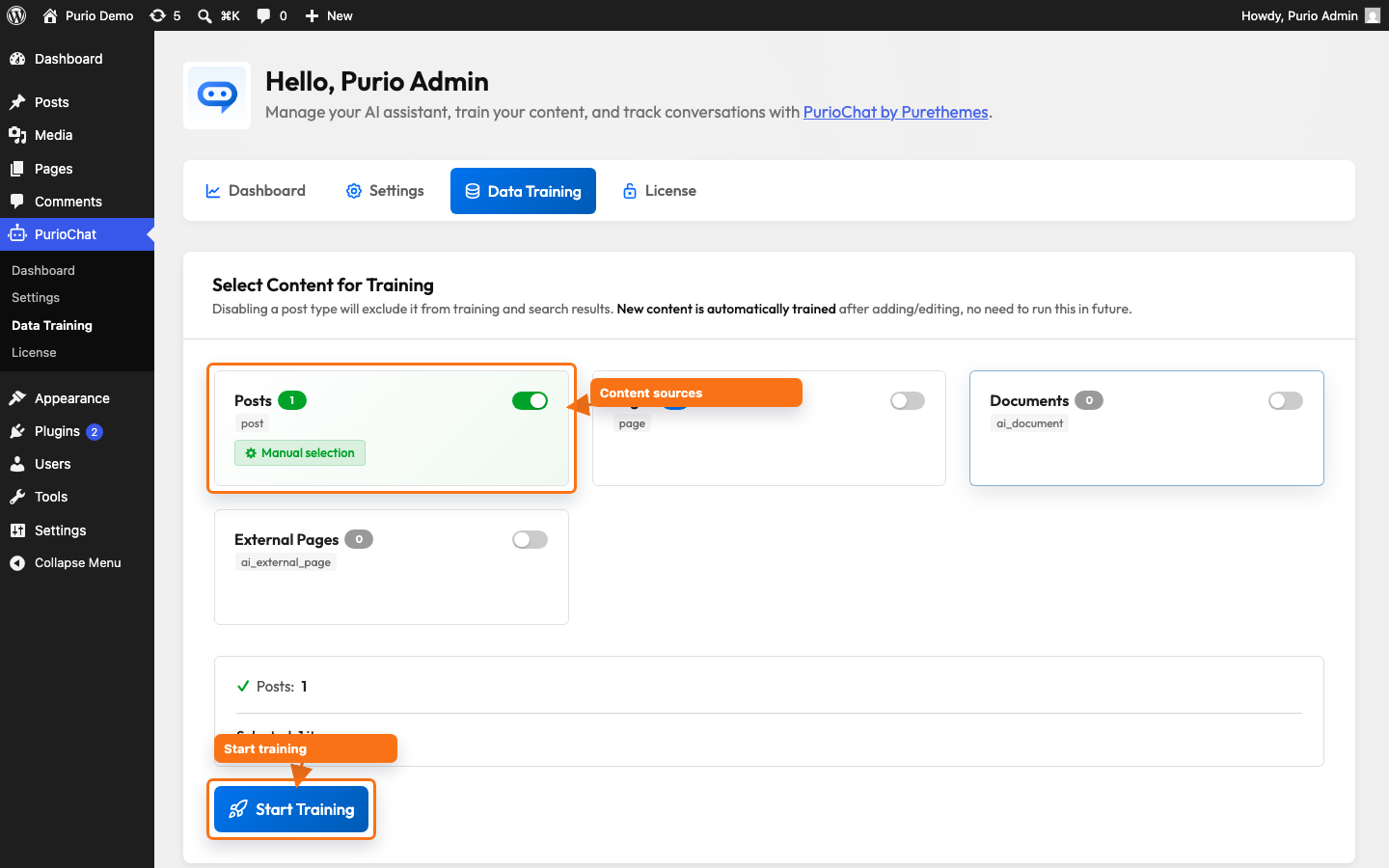
- The content type is enabled for training. Go to PurioChat → Data Training and make sure the relevant content type (for example Posts or Listings) has its toggle switched on. Posts (any theme) and Listings (Listeo theme) are free; Pages, WooCommerce Products, Documents, External Pages and custom post types are Pro.
- The item is published. Only published content is indexed — drafts, pending, and private items are skipped.
- You’ve trained it. Enabling a type doesn’t index it. Click Start Training on the Data Training tab and let it finish. Until then, your search field shows “No data available yet. Please train the AI first.”
How do I improve search quality?
If results feel off, two adjustments make the biggest difference:
- Write descriptive titles and content. PurioChat matches by meaning, so clearer titles and text help the AI connect a visitor’s question to the right page. Vague, one-word titles are the most common cause of weak matches.
- Lower the match threshold if results are too strict. The Minimum Match Percentage (default
50) drops any result scoring below that similarity. If good content is being filtered out, lower it; if results are loose and off-topic, raise it. The slider moves in steps of 5. Find it on the AI Search tab on Listeo sites, or in the Search Field section of PurioChat → Settings on other sites.
Important: If you notice that some content is missing from embeddings enable Use fallback data retrieval method option in Additional Settings toggle and retrain.
[/lore_alert_message]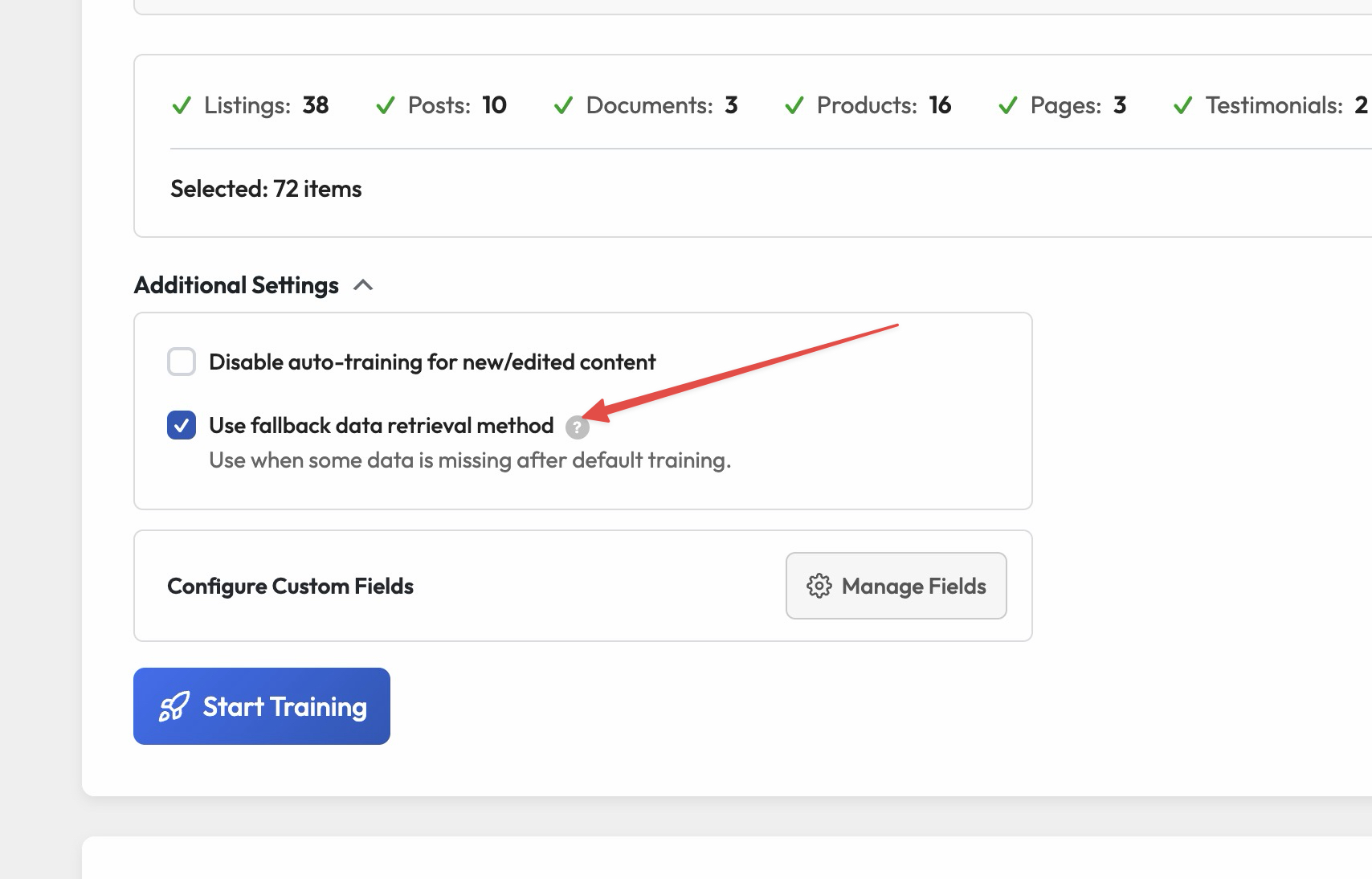
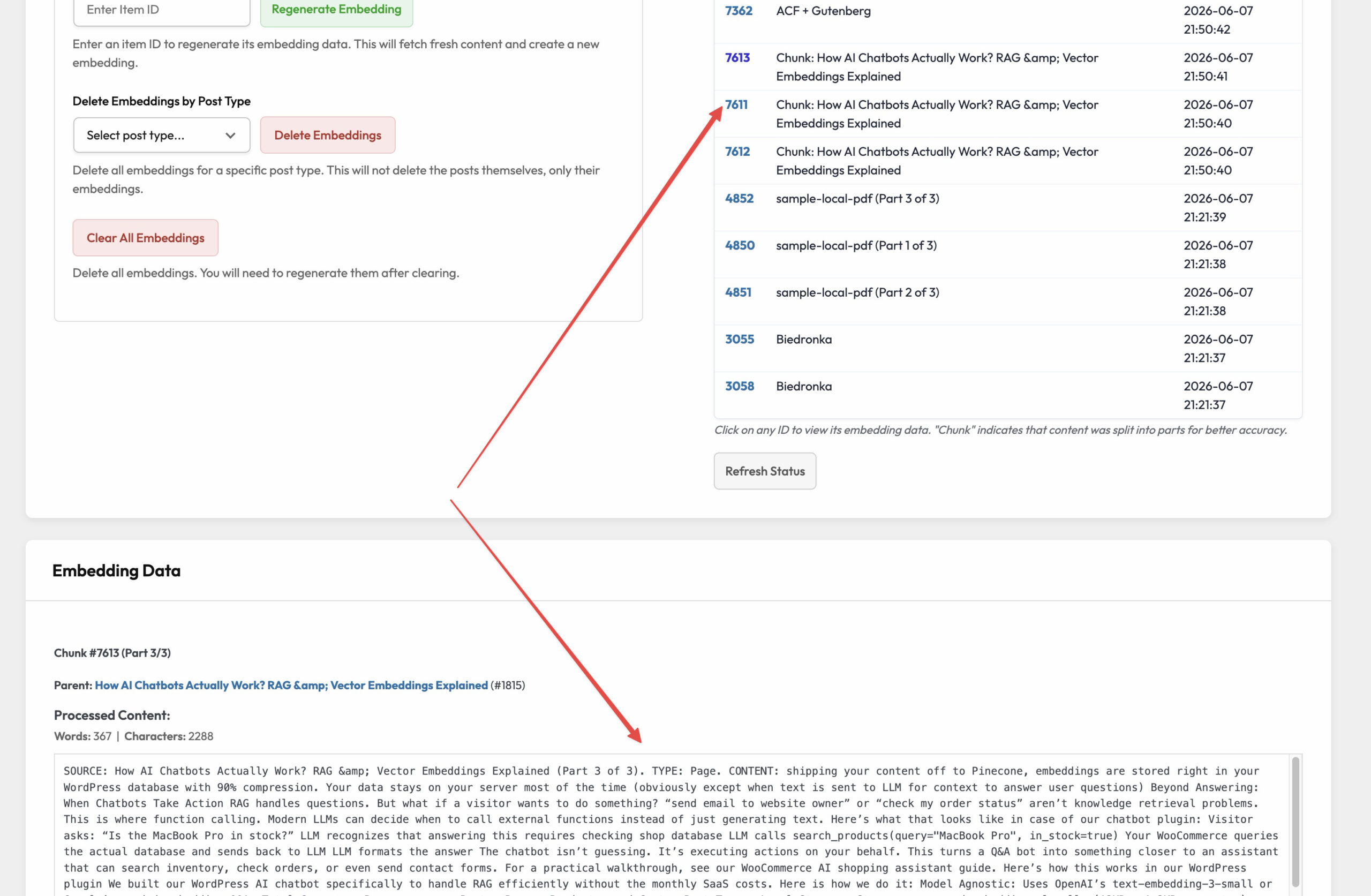
To check if all data from your post/page/product is in place after training scroll down to “Database Management” search for your post you want to check and click on embedding numer. It will reveal all processed data.
Provider & API errors
I see “Insufficient quota” or a rate-limit error
This almost always means your AI provider account isn’t set up to be charged yet — the API key works, but there’s no usable balance behind it. In your provider’s dashboard (OpenAI, Google, Mistral or OpenRouter):
- Enable billing for the account.
- Add a payment method (OpenAI and OpenRouter expect a minimum balance of around $5).
The error clears on the next request once billing is active. PurioChat never charges you for AI usage — you pay your provider directly for what you use.
Gemini keeps saying “Too many requests” (rate limit)
Gemini’s free tier has very low rate limits, so it’s easy to hit a wall during busy periods or while training a lot of content. If you’re on Gemini:
- Enable billing in Google AI Studio / Google Cloud and make sure a billing account is assigned to your project. Without that link, you stay on the strict free-tier limits.
- Gemini Flash models work on the free tier, but Gemini 3.1 Pro requires billing.
If your provider has the headroom, you can also raise PurioChat’s own Global API Rate Limit (per hour) under PurioChat → Settings → API Configuration. But the provider limit is what you’re hitting here, so fix billing first.
Installation & setup
“This plugin cannot be activated because required plugins are missing or inactive”
PurioChat ships as two parts: a free base plugin and the Pro add-on. The Pro plugin can’t run on its own — it needs the free base installed and active. This error means you activated Pro without the free version in place.
Install and activate the free PurioChat base plugin first, then activate Pro. Then enter your license key at PurioChat → License and click Activate.
A few more common questions
I switched AI providers and now search is broken
Different providers and embedding models produce embeddings in different formats and sizes, so old vectors can’t be compared against a new provider’s. PurioChat clears your existing embeddings when you switch providers and shows a retrain notice. Go to PurioChat → Data Training and run Start Training again. The same applies whenever you change the Embedding Model.
My really long page seems to get cut off
Listings and products are indexed as a single entry capped at about 8,000 characters, so very long ones may be truncated. Posts and pages are handled differently — they’re split into overlapping chunks so the whole thing stays searchable. If a detail near the end of a long listing isn’t being found, move it higher up or split the content across more focused items.
The chatbot says “Please train the AI first”
This appears when nothing has been trained yet, or when everything was cleared (for example, after switching providers). Go to PurioChat → Data Training, confirm at least one content type is enabled, and click Start Training.
Why does a visitor see “Too many requests” on my site?
Besides provider limits, PurioChat has its own per-visitor safety limits (per minute, per 15 minutes, and per day) to prevent abuse. If real visitors are being blocked, raise those limits under PurioChat → Settings → API Configuration, or use the Clear all IP limits link to reset counters. See Rate Limit Settings for the full breakdown.