It literally takes 30 sec to create one 😉
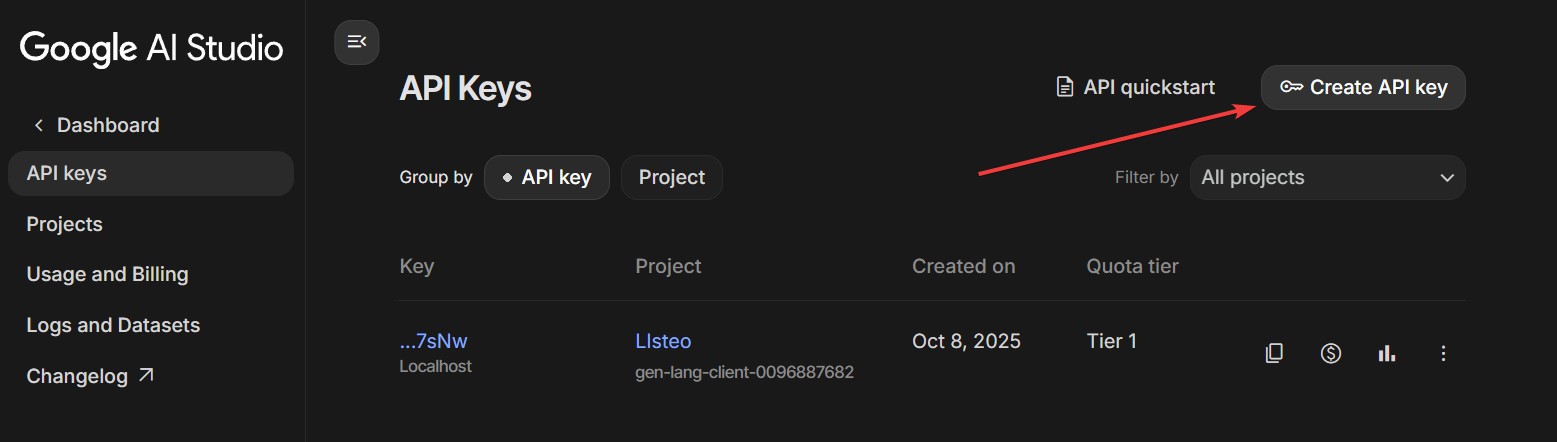
How to Create Gemini API Key
- Go to https://aistudio.google.com/api-keys
- Click “Create API Key” button
- Select or create a Google Cloud project
- Copy your API key and paste in our plugin
Upgrade to Paid Tier
- Go to https://aistudio.google.com/api-keys
- Find your project
- Click “Set up Billing” button
- Link a Google Cloud billing account
| FREE TIER | |||||
|---|---|---|---|---|---|
| Model | RPM | TPM | RPD | Input Price | Output Price |
| Gemini 3Flash | 5 | 250k | 250 | Free | Free |
| Gemini 3 Pro | 2 | 125k | 50 | Free | Free |
| Gemini Embedding | 100 | 30k | 1,000 | Free | Free |
To avoid hitting limits enable billing in Google settings.
| PAID TIER (Tier 1) | |||||
|---|---|---|---|---|---|
| Model | RPM | TPM | RPD | Input Price | Output Price |
| Gemini 3 Flash | 1,000 | 1M | 10k | $0.30/1M | $2.50/1M |
| Gemini 3 Pro | 150 | 2M | 10k | $1.25-2.50/1M* | $10-15/1M* |
| Gemini Embedding | 3,000 | 1M | – | $0.15/1M | – |
RPM = Requests Per Minute | TPM = Tokens Per Minute | RPD = Requests Per Day
Billing
Please monitor your billing. OpenAI is safer because you prepay credits. Gemini bills you after the cycle, so costs can spike if you miss it.