Owners can manager their booking resources the same way they already control listing. On plugin activation, Listeo Booking Plus will automatically create a Manage Resources page and set correct content and template for that. In case it didn’t happen, here’s instruction
Setting up the page
- Create a new page (e.g. “Manage Resources”).
- Drop the shortcode in:
[lbp_manage_resources]- Add the page to the owner’s dashboard menu (you can configure the dashboard menu under Listeo Core → Pages → Resource page).
What owners can do from this page
- Submit a new resource
- Edit any of their own resources.
- Duplicate a resource to spin up a near-identical one quickly.
- Import/Export iCal – import or export bookings to their personal calendar
- Pause a resource — temporarily takes it out of the booking pool without deleting it.
- Delete a resource permanently.
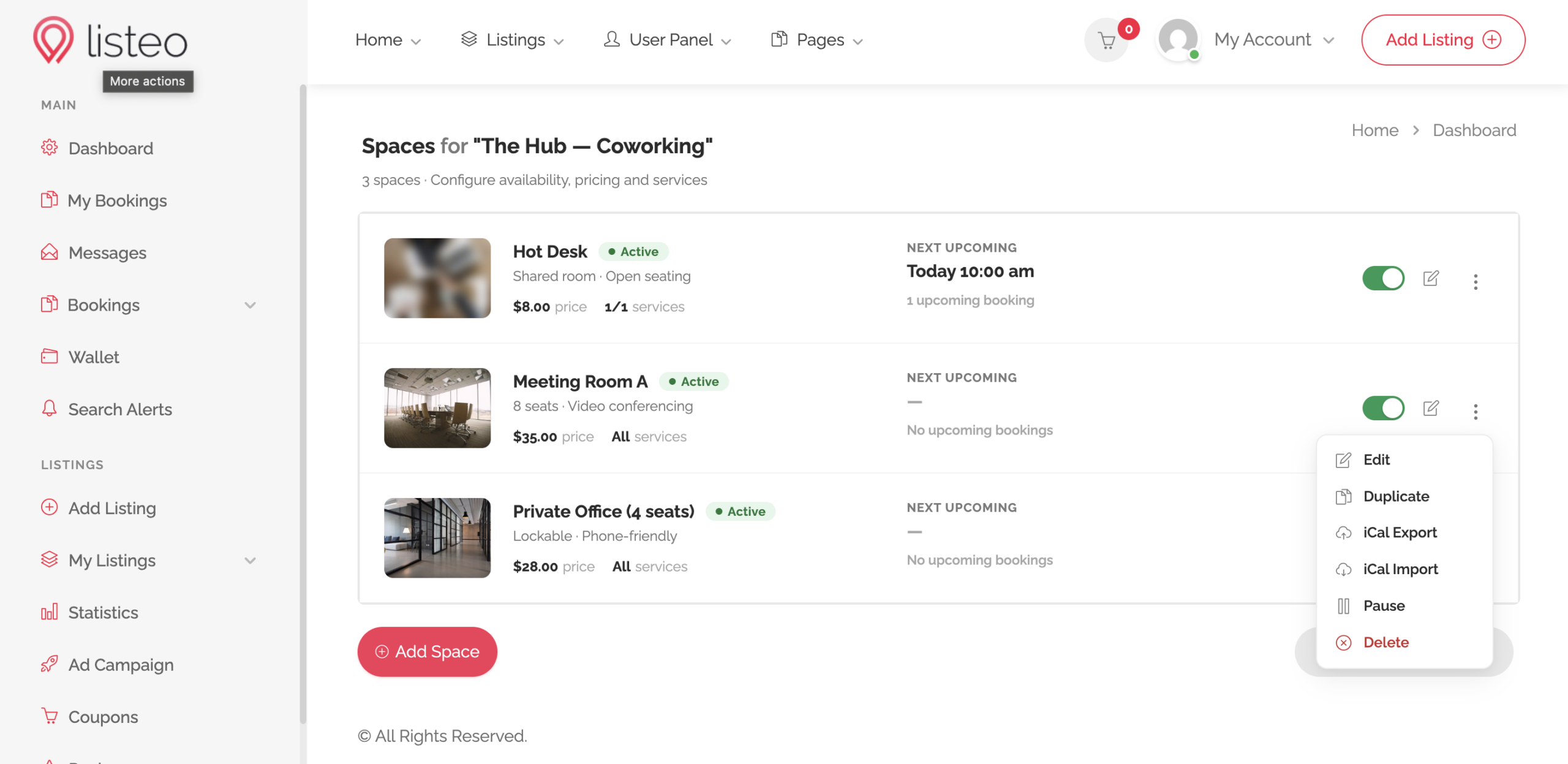
Each resource has its own availability calendar and its own iCal export / import URLs. This mirrors Listeo Core’s per-listing iCal flow — if you already use it for listings, the resource version will feel identical.
Each resource gets its own subscribe URL so external calendars (Google, Apple, Outlook, Airbnb, Booking.com) always see the right slice of the schedule.
Exporting a resource’s bookings
- Open the Manage Resource page for your listing
- Find the iCal Export section.
- Copy the subscribe URL.
- Paste it into Google Calendar (Other calendars → From URL), Apple Calendar (File → New Calendar Subscription), or any iCal-compatible app.
The feed updates every time the external app re-fetches it (the cadence is controlled by the receiving calendar — typically a few hours).
Importing external calendars into a resource
- In the iCal Import section, click Add Calendar.
- Enter a friendly name (e.g. “Airbnb — Apartment 4”) and the external
.icsURL. - Save.
Listeo Booking Plus pulls events from each imported URL on a schedule and creates blocked bookings on the resource. Imported events are tagged so a later re-fetch can update or remove them cleanly without disturbing real bookings.
Conflict rules
- A booking from your site always wins — imported events never overwrite an existing booking.
- An imported event that overlaps with an existing import is updated, not duplicated.
- Removing an imported calendar removes only its events; manually-added bookings stay put.